# Minecraft
# Changing Minecraft server version
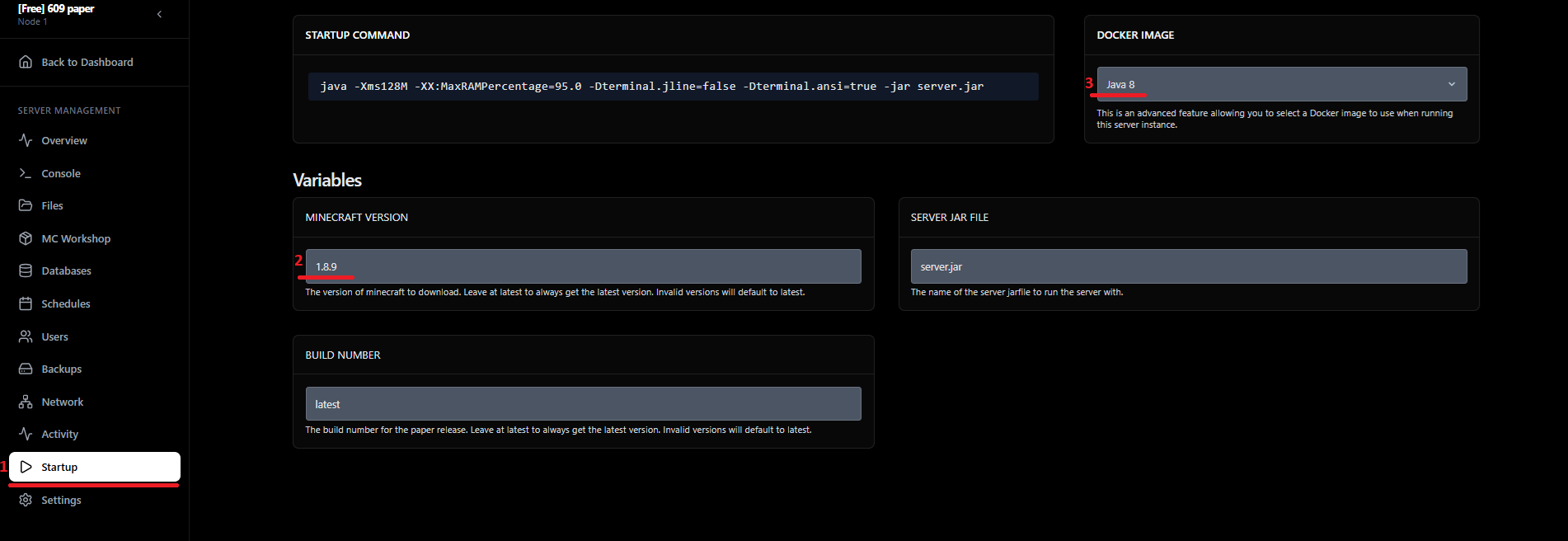
To change your Minecraft server version, simply follow these steps:
**1.** Go to the panel available at:
**2.** In the menu on the left, select Startup.
**3.** In Variables, enter the desired version in the MINECRAFT VERSION field.
**4.** Then, in DOCKER IMAGE, choose the appropriate Java version.
**Required Java versions:**
1.0 – 1.6 - Java 6/7
1.7 – 1.16 - Java 8
1.17 - Java 16
1.18 – 1.20.1 - Java 17
1.20.2 – 1.20.4 - Java 17 (recommended 21)
1.20.5+ and 1.21 - Java 21
[](https://osalj.co.uk/images/howto/mc-version.png)
**5.** Next, from the left menu select Files, and delete the server.jar file.
**6.** Download the correct server.jar version from:
**7.** Upload the new server.jar file to your server.
**8.** Start your Minecraft server.
✅ Done! Your server will now run on the version you have selected.